

Conditions#
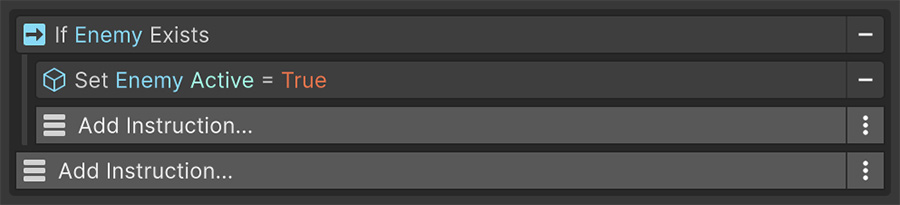
A Condition is a synchronous check that returns true or false without changing game state. Use checks such as is the door locked? or does the player have the key? to decide whether Instructions branch, loop, wait, restart, or exit.
Anatomy#
Each Condition has three controls beside its title:
| Control | Effect |
|---|---|
| Enabled | A disabled Condition is skipped and treated as passing. |
| Breakpoint | Pauses the editor when the Condition is evaluated. |
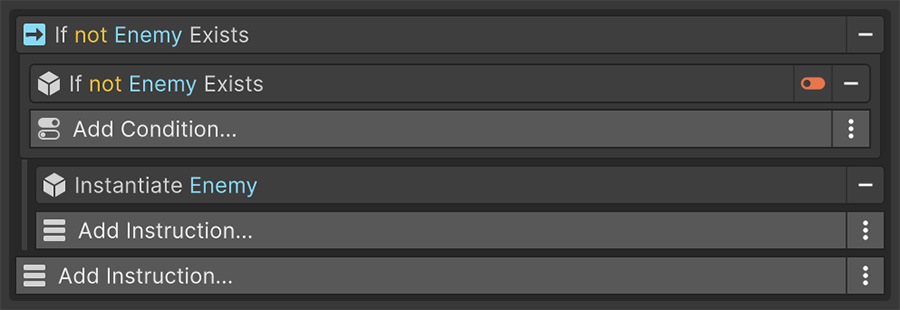
| Sign | Inverts the result. The title updates to show the word not. |
Use the Sign toggle when the opposite Condition doesn't exist. Inverting one check produces forms such as is not active, does not have the tag, and is not a child of.
Combining Conditions#
A Conditions list combines its entries with AND by default: every Condition must pass for the list to pass. Add each required check to the same list to combine them.
An empty list passes. This means an If with no Conditions always runs, and a Wait Until with no Conditions returns immediately.
Some Instructions expose OR
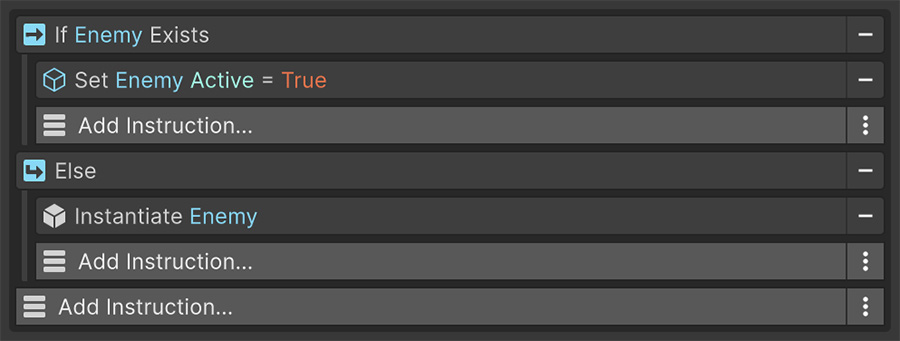
The underlying system supports OR as well as AND, and some Instructions expose it. Where it isn't exposed, express either or by nesting a second If inside an Else, or by building the choice into a single Signal.
Where Conditions appear#
The Instruction or Signal containing a Conditions list decides how to use its result:
| Host | Uses the result to |
|---|---|
| If | Decide whether to run its nested Instructions. |
| Else If | Decide whether to run its nested Instructions when the preceding branch didn't run. |
| While | Decide whether to run the loop body again. |
| Exit | Decide whether to end the list. |
| Restart | Decide whether to jump back to the top. |
| Wait Until | Decide whether to stop waiting. |
| Wait While | Decide whether to keep waiting. |
| Conditions | Combine a nested group with AND or OR. |
| Filter | Decide which entries to include in a collection. |
Conditions also appear inside components from other packages. You can add them to your own components when designers need to configure a check.
Compare Numbers offers equal, not equal, less than, less than or equal, greater than, and greater than or equal in one Condition.
Boolean evaluates any Bool Signal
The Boolean Condition takes any Bool Signal and passes when it's true. Because Signals compose, this Condition can evaluate nested calculations without a dedicated Condition for each case.
Evaluation cost#
Conditions run synchronously and return before the frame continues. Comparisons and tag reads have little cost.
Conditions that search the scene or resolve a Signal that performs a physics query do more work. A While checks its Conditions before each iteration, and a Wait Until checks every frame, so repeated evaluation can add up.
Wait Until polls
Wait Until and Wait While re-evaluate their Conditions once per frame until the answer changes. Use them for inexpensive checks; an expensive Signal repeats its work every frame.
Where possible, use a binding so the Event reacts to the change instead of polling for it.
Try it#
- Add an If with a Compare Numbers Condition and log a different message on each side of the check.
- Flip the Condition with the not toggle and watch the two branches swap.
- Stack two Conditions in the same If and confirm both must pass.
- Replace them with a single Conditions Condition set to OR and confirm either now passes.
- Set a breakpoint on a Condition and inspect the values it's comparing while the editor is paused.
Where to go next#
- Control flow — use Conditions in branching, looping, waiting, and exits.
- Signals — supply the values that Conditions compare.
- Conditions reference — inspect every generated Condition entry.