

Control flow#
By default, an Instructions list runs from top to bottom. Control flow Instructions change that order by branching, looping, waiting, or exiting.
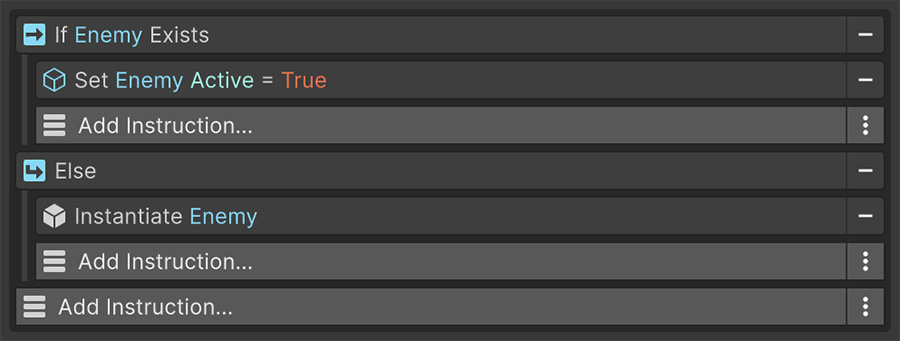
Branching#
If#
If is the Instruction that puts Conditions to work. It holds two things: a list of Conditions to check, and a list of Instructions to run when they pass.
The Inspector indents nested Instructions to show which branch contains them. When the Conditions fail, If skips its nested list and reports failure. An Else If or Else below it uses that result to decide whether to run.
Else If#
Else If runs only when every preceding If and Else If failed and its own Conditions pass. A chain can contain multiple Else If branches.
Else#
Else runs only when every preceding If and Else If failed. It has no Conditions of its own.
Only one branch runs
- If the player has the key → open the door
- Else If the player has a lockpick → play the picking animation
- Else → play the it's locked sound
The chain runs exactly one branch: the first whose Conditions pass, or Else when every check fails.
The chain must be adjacent
Else If and Else look at the result of the Instruction immediately above them. Inserting an unrelated Instruction between an If and its Else breaks the chain. Keep them together.
Looping#
While#
While runs its nested Instructions repeatedly for as long as its Conditions pass. It checks the Conditions before each pass, so a loop whose Conditions start false doesn't run.
Every While needs an exit
Make sure the Conditions can become false or the Event can be canceled. If the loop repeats without waiting, it can block the editor before either happens. Add a wait, even for one frame, when other parts of the game need time to change the loop's state.
Foreach#
Foreach runs its nested Instructions once for every item in a collection. Each pass makes three values available to everything nested inside:
| Value | Is |
|---|---|
| Item | The entry currently being processed. |
| Index | Its position, starting at 0. |
| Count | The total number of entries. |
These only exist inside the loop. Outside it, the Signal dropdowns don't offer them.
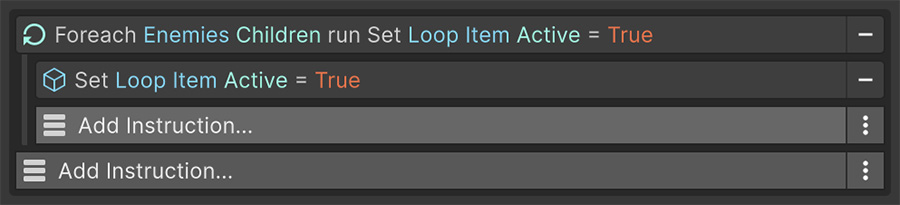
When an item is a game object or component, Foreach sets Target to that object for the current pass. To disable every child, iterate over the children and point one Set Active Instruction at Target. See Source & Target.
Collections come from many places — variables, transform children, tag lookups, physics queries, number ranges, the characters of a string. See Collections.
Restart#
Restart sends execution back to the first Instruction in the list.
Like Exit, it carries its own Conditions list. Leave it empty to restart every time, or add Conditions to restart only when they pass. The title then becomes Restart if ….
Combined with a Wait, it turns an Event into a permanent loop.
Exiting#
Exit#
Exit ends the current Instructions list immediately. Nothing below it runs.
Exit holds its own Conditions list, so the check and the exit are a single Instruction rather than an If wrapping one. An empty Conditions list means always exit; a filled one renders as Exit if ….
Use Exit at the top of an Event to check whether the sequence should run. For example, exit when a door is locked so the opening sequence can stay at the outer indentation level.
A guard exits before later work
- Exit if the door is locked
- Run the rest of the opening sequence at the outer indentation level.
If the door is locked, the Event skips the opening sequence. You can add another Exit if below the first to check a second requirement.
Exit checks keep the main sequence at the outer level
Place two or three Exit if Instructions before a long sequence instead of nesting the sequence inside an If. The main path stays at the outer level, and each precondition can be disabled independently while debugging.
Cancel Event#
Cancel Event stops the Event component you select, which can be a different Event from the one containing this Instruction. Use it when a manager needs to cancel a behavior running elsewhere.
Canceling propagates into nested lists, so nothing keeps running inside the Event that was stopped.
Waiting#
Wait Instructions suspend the list until a duration elapses or a Condition changes:
| Instruction | Resumes when |
|---|---|
| Wait for Seconds | The duration elapses, in game time or real time. |
| Wait for Frames | The given number of frames are drawn. |
| Wait Until | The Conditions become true. |
| Wait While | The Conditions stop being true. |
Waits are checked against cancellation every frame, so an Event that's disabled mid-wait stops promptly.
Try it#
- Build the locked-door chain above with three Debug Log Text Instructions and confirm only one ever runs.
- Add a Foreach over an object's children and log the Index of each.
- Replace an If wrapping a long sequence with an Exit carrying the inverted Condition, and confirm the sequence still runs under the same Conditions.
- Open the Conditions Toggle and Loop Variables example scenes and inspect their branches and loops.
Where to go next#
- Conditions — define the checks that control each branch.
- Collections — supply the entries that Foreach iterates.
- Source & Target — understand the context changed by a loop.