

Instructions#
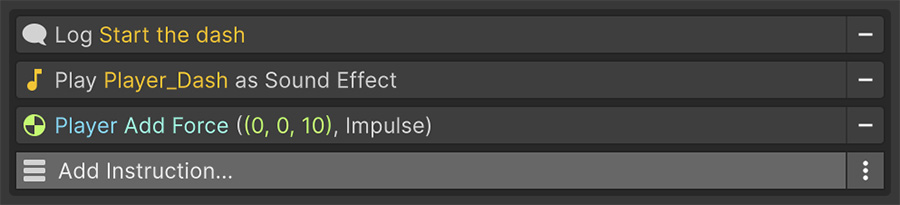
An Instruction is one operation, such as moving an object, playing a sound, waiting, or changing a value. An Event executes its Instructions list from top to bottom. Each Instruction finishes before the next one starts.
The execution model#
The list keeps an index of which Instruction is running. After each one completes, the index advances and the next runs. When the index passes the end of the list, the Event stops.
Two consequences matter:
- Instructions can take time. A wait, tween, or scene load delays everything below it until it finishes.
- Instructions run in order. One list doesn't run its entries in parallel. If you need two sequences to run at once, put them in two Events.
Instructions run in order
- Add Debug Log Text with the text
Ready. - Add Wait for Seconds with a duration of
3. - Add Debug Log Text with the text
Go!.
In Play mode, Ready appears immediately and Go! appears three seconds later. The wait suspends the list between them.
Waiting#
Four Instructions suspend the list without blocking the game. Tweens and scene loads also take time, but these four exist specifically to wait:
| Instruction | Resumes when |
|---|---|
| Wait for Seconds | The duration has elapsed. Can use game time or unscaled time. |
| Wait for Frames | The given number of frames have been drawn. |
| Wait Until | The Conditions become true. |
| Wait While | The Conditions stop being true. |
Wait for Seconds respects the time scale by default, so waits stretch when the game slows down and stop entirely when it's paused. For a pause menu, switch the wait to real time so it continues while the game is paused. See Time & tweens.
Success and failure#
Every Instruction reports a result. Logging and similar operations normally succeed, while branching Instructions use the result to decide what happens next.
| Result | Meaning |
|---|---|
| Success | Continue with the next Instruction. |
| Failure | Continue, but tell the next Instruction that this one didn't run its body. |
| Restart | Jump back to the top of the list. |
| Exit | Stop the list entirely. |
This is the mechanism behind If / Else If / Else: an If whose Conditions fail reports failure, and the Else below it looks at that result to decide whether to run. See Control flow.
Disabling an Instruction#
Every Instruction has a toggle. When you switch it off, the Instruction stays in the list, grayed out, and the Event skips it at runtime.

Use the toggle to isolate a problem while preserving the Instruction's configuration. You can re-enable it when you're ready to use it again.
Disabled Instructions still pass results along
A disabled Instruction passes along the success or failure of the one above it, so disabling an If doesn't break the Else beneath it.
Breakpoints#
Each Instruction also has a breakpoint marker. Reaching a marked Instruction pauses the editor like a code breakpoint and preserves the scene state for inspection.
Breakpoints work only in the Unity editor and are ignored in builds, so you don't need to remove them before shipping.

Canceling#
A running Event stops in three situations:
- Its game object or Event component is disabled or destroyed.
- A Cancel Event Instruction targets it.
- The application is quitting.
Cancellation is checked between Instructions and inside every built-in wait, so a canceled Event stops promptly rather than finishing its current wait first.
Cancellation is not a rollback
Stopping an Event doesn't undo the Instructions that already ran. If it already opened a door and changed a variable, those changes remain. Decide which intermediate states your game can handle before adding waits to a sequence.
Instructions that contain nested lists — If, While, Foreach — propagate cancellation into their children, so nothing keeps running inside a canceled Event.
Nested lists#
Several Instructions — If, While, Foreach and others — hold lists of their own, and those lists are drawn indented inside the parent.
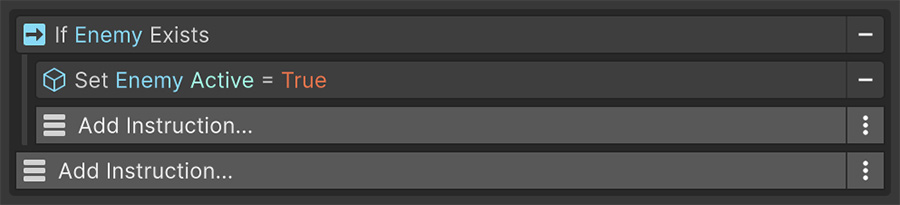
Nesting has no depth limit, but deep nesting obscures execution order. Past 2 or 3 levels, move the inner sequence into its own Event and call it.
Try it#
- Build the Ready / Wait / Go! sequence above, then disable the middle Instruction and watch it get skipped.
- Add Wait for Frames set to
1and a Restart to repeat the list. Then remove the Restart to stop repeating it. - Set a breakpoint on the last Instruction and confirm the editor pauses there.
Where to go next#
- Control flow — branch, loop, wait, and exit from an Instructions list.
- Conditions — understand how checks are evaluated and combined.
- Instructions reference — inspect every generated Instruction entry.