

Pooling#
A pool keeps inactive game objects ready to reuse and takes them back when you're done. Use pooling for repeatedly spawned objects, such as bullets, impact effects, damage numbers, and footstep decals, to reduce repeated creation and destruction.
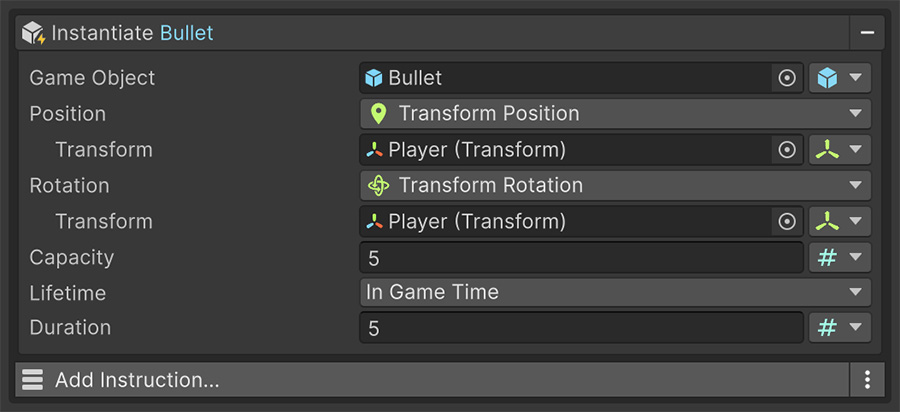
Instantiate from Pool#
Use Instantiate from Pool to request an instance of a prefab. Set its position and rotation, then configure the pool's capacity and the instance's lifetime.
The first time it runs for a given prefab, the pool is created and filled. Later requests reuse available instances; the pool creates another if none are ready.
| Setting | Controls |
|---|---|
| Prefab | The object to pool. Each prefab gets its own pool. |
| Capacity | How many instances to prepare up front. |
| Lifetime | Forever, In Game Time or In Real Time. |
| Duration | How long before the object returns to the pool, when the lifetime is timed. |
The lifetime#
Lifetime controls whether and when the pool reclaims an object automatically.
| Lifetime | Behavior |
|---|---|
| Forever | The object stays out until something returns it. The default. |
| In Game Time | Returns itself after Duration seconds of scaled game time. |
| In Real Time | Returns itself after Duration seconds of wall-clock time. |
Use a timed mode for effects with a fixed lifetime, such as a muzzle flash. The pool then reclaims the object without a separate destroy after N seconds Instruction. Duration applies only to these modes; Time & tweens explains their clocks.
A muzzle flash
Set Instantiate from Pool to the flash prefab, Capacity to 8, Lifetime to In Game Time, and Duration to 0.2 seconds. The pool reuses those instances as they return. If more than eight flashes overlap, it creates additional instances.
For a projectile that returns on impact, use Forever and return it explicitly when the collision occurs.
Forever is the default
A new pool configuration doesn't return objects automatically. If an effect remains active, check that you've selected a timed lifetime.
Timed lifetimes require a Duration above 0. A value of 0 doesn't schedule an automatic return.
Choosing the capacity#
Capacity sets how many instances the pool prepares in advance. Choose it based on the number of objects that can be active at once:
- Too small and the pool grows during play, moving the allocation to a busy moment.
- Too large and the pool holds memory for objects that are never used.
Aim for the peak number that can plausibly be alive at once. For a weapon firing ten times a second with a half-second effect, five is about right; eight gives you headroom.
What pooling changes#
A pooled object retains its state between uses. Reset values that should start fresh each time the object leaves the pool.
Pooled objects remember their last life
Changes such as modified variables, materials, animation state, or velocity can remain when the pool reuses an object.
Use an On Enable Trigger on the prefab to reset the state your object needs. It fires each time the object is taken from the pool.
If an object behaves differently on its second use, check which values remain from its previous use.
What to pool#
| Worth pooling | Not worth pooling |
|---|---|
| Projectiles | The player |
| Impact and muzzle effects | Level geometry |
| Damage numbers and floating text | Objects created once at startup |
| Footstep and decal marks | Anything spawned a handful of times per session |
| Enemies in a wave-based game | Unique story objects |
Pooling is most useful when objects are created and returned repeatedly. An object created once doesn't benefit from reuse, while still requiring pool configuration and lifecycle handling.
Referencing the object you got#
Instantiate from Pool doesn't hand you back a reference to the instance it produced, and it doesn't change Target.
Many pooled effects, such as muzzle flashes and impacts, need no follow-up reference. When an instance needs configuration, put an On Enable Event on its prefab. The Event runs whenever the object leaves the pool and receives that instance as Source.
On Enable runs on every reuse
Keep reset and setup logic on the prefab's On Enable Event. Each reused instance then initializes its own state without requiring a reference from the spawning Event.
Where to go next#
- Game Object Signals — resolve references to instantiated objects.
- Time & tweens — choose the clock used by a pool duration.
- Events — use On Enable to reset pooled objects.