

Bindings#
Many Signals can report when their value changes. A binding subscribes to those reports so an Event can update a health bar, score label, or other dependent state. Some bindings still read their Signal every frame, but only run the Event when the value changes.
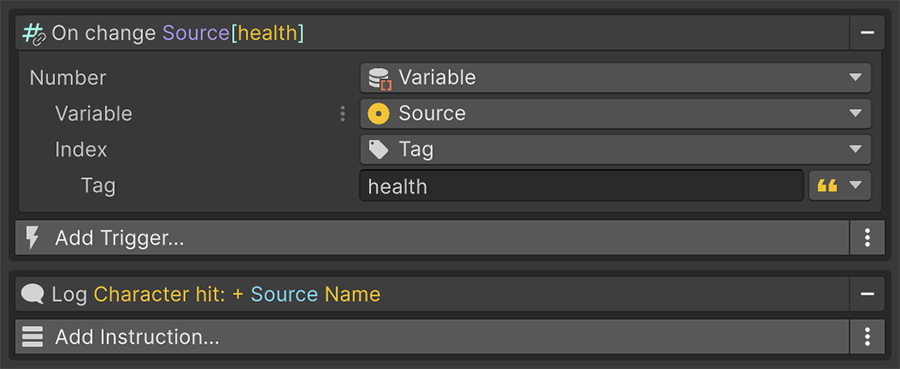
Replace polling with a binding#
An On Update Event can keep a health bar current by reading health and writing the fill every frame, even when health hasn't changed.
To update the bar only when health changes, replace On Update with an On Number Change Trigger watching health. Keep the Instruction that writes the fill. The Event now runs when the Trigger detects a new health value.
A binding also separates the state change from its reactions. The system that changes health doesn't need a reference to the bar, and another reaction can subscribe independently.
The change Triggers#
Each bindable value type has a corresponding Trigger:
| Trigger | Watches |
|---|---|
| On Number Change | Number |
| On String Change | String |
| On Bool Change | Bool |
| On Vector2 Change | Vector2 |
| On Vector3 Change | Vector3 |
| On Quaternion Change | Quaternion |
| On Color Change | Color |
| On Game Object Change | Game Object |
| On Sprite Change | Sprite |
| On Texture Change | Texture |
| On Material Change | Material |
| On Animation Clip Change | Animation Clip |
| On Audio Resource Change | Audio Resource |
| On Scriptable Object Change | Scriptable Object |
Each takes a Signal of that type and fires whenever it becomes something different.
How change is detected#
Signals use three subscription modes, which determine how often they read their value and run the Event:
| Mode | How it works | Used by |
|---|---|---|
| On Change | The Signal is read every frame and the Event runs only when the value differs. | Variables and most inexpensive lookups. |
| On Update | The Event runs every frame, without comparing. | Time Signals, whose value changes every frame by definition. |
| Custom | The underlying system raises its own notification and the Signal forwards it. | Sources that already provide an event. |
A Signal that supports none of these can't be bound to, and the change Triggers won't offer it.
On Change still reads the Signal every frame
On Change reduces how often the Event runs, but the Signal is still evaluated once per frame per subscription. A variable lookup has little cost; a physics query does more work.
A binding that performs a raycast, scene search, or distance calculation over a large collection repeats that work every frame. For an expensive Signal, poll it at a rate you choose instead.
Subscription lifecycle#
A binding subscribes when the Event is enabled and unsubscribes when it's disabled. The Event handles this cleanup.
The binding doesn't observe changes while the Event is disabled or replay them when you re-enable it. If the system needs the current value when it resumes, read that value using an On Enable Trigger.
Where bindings pay off#
Bindings suit reactions that depend on another value:
| Situation | Use a binding to |
|---|---|
| UI that mirrors state | Update health bars, scores, ammo counters, names, or portraits. |
| Reacting to a threshold | Run an If that checks the changed value against a threshold. |
| Chained state | Update another value when the source changes. |
| Debugging | Log when and how often a value changes. |
Where they don't#
Choose another approach when the operation needs a different schedule:
| Situation | Use instead |
|---|---|
| Continuous motion | Use On Update to run each frame. |
| A one-off check at a known moment | Read the value at that moment. |
| An expensive Signal | Poll at a chosen interval, or store the result in a variable and bind to that. |
Where to go next#
- Triggers — compare change Triggers with action and lifecycle Triggers.
- Variables — bind to the state most Events read and write.
- User interface — apply bindings to on-screen elements.