

Visual Script#
Summary
Visual Script is a free Unity asset that lets you build game logic without writing code. You choose Triggers that determine when an Event runs and Instructions that define what it does.
You can use it to prototype a mechanic, build logic for a game, or create a scripting layer that your programmers extend with custom nodes.
Choose a starting point#
Start with the Manual if Visual Script's terminology is new. Registry packages are C# scripts that Unity compiles inside your project, so inspect their source and dependencies before installing them.
- Manual — install Visual Script, build Events, and learn the runtime rules for Signals, Variables, saving, input, pooling, and other systems. No programming is required.
- Registry — find, inspect, and install community nodes, lists, and modules, or publish your own packages. The same catalog is available at visualscript.dev.
- Scripting API — add Instructions, Conditions, Triggers, Signals, save integrations, and settings from C#.
How Events run#
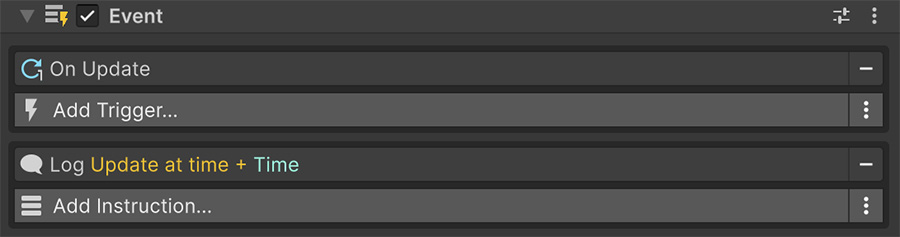
The Event component listens for one or more Triggers. When a Trigger fires, the Event runs its Instructions from top to bottom.
| Part | Does | Door example |
|---|---|---|
| Event | Holds the Triggers and ordered Instructions for one behavior. | Controls opening the door. |
| Trigger | Starts the Event when something happens. | Detects the player entering the doorway. |
| Instruction | Performs one action in the sequence. | Plays a sound or animates the door. |
| Condition | Returns true or false for a control-flow Instruction. |
Checks whether the player has the key. |
Install Visual Script#
Install Visual Script from My Assets in Unity's Package Manager:
- Download Visual Script from the Unity Asset Store.
- In Unity, open the Package Manager from
Window→Package Manager. - Change the scope to
Packages→My Assetsand search for Visual Script. - Select the package and click Install.
The installation walkthrough lists the requirements and explains how to import the example scenes.
Support development#
Sponsorship funds work on new systems, nodes, and documentation. Visual Script remains available to everyone without sponsorship.
Sponsor tiers include these benefits:
| Benefit | Includes |
|---|---|
| Sponsor recognition | Your name or studio in the sponsor listings. |
| Roadmap access | Current development plans and later roadmap items. |
| Project input | Discussions that shape feature priorities. |
| Beta access | Early access to experiments, such as a documentation question-answering assistant. |
Every tier funds development
Sponsorship supports the work behind future Visual Script releases and their documentation.
Report documentation errors#
Email [email protected] when a page contains an error or omission, or when an explanation needs clarification. Include the page URL and a short description of the issue.
Where to go next#
- Get started — build an Event that launches a cube when you click it.
- Event component — learn the execution and lifecycle rules behind every Event.
- Finding Registry packages — search and inspect community code before installing it.
- Scripting API conventions — apply the attributes, naming, and serialization patterns used by custom nodes.