

Variables as lists#
Both Local Variables and Global Variables hold an ordered list of entries. You can add and overwrite entries while the game runs, then read the variable as a collection.
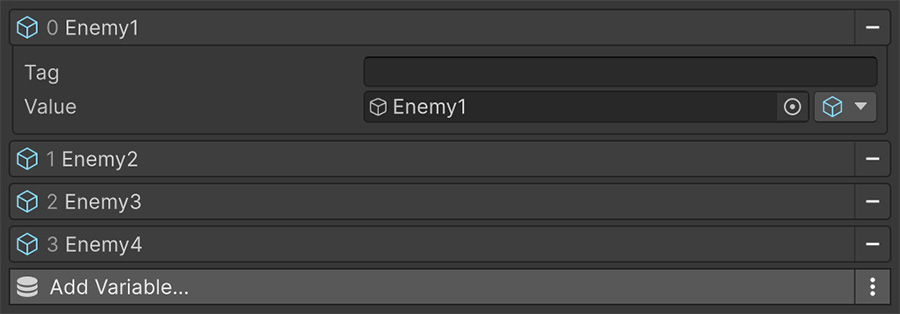
Picking an entry#
The empty Tag fields in the image leave each entry identified by position. The Inspector shows an entry's index in its header, and that index is how Signals address it.
Every Signal that reads or writes a variable has an Index dropdown that selects the entry. It defaults to First in both directions, so a newly configured Signal points at entry 0.
Getting#
Get Signals select an entry by position or tag:
| Selector | Picks |
|---|---|
| First | The first entry. |
| Last | The last entry. |
| Index | The entry at a position, counting from 0. |
| Tag | The first entry with a matching tag. |
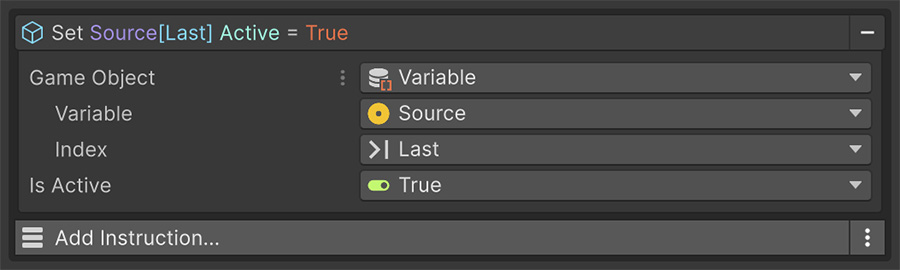
The Index selector has a Wrap setting that controls reads outside the list's bounds. Clamp, the default, uses the nearest end; Repeat wraps around; None leaves the index unchanged and reads no entry. Use Clamp or Repeat when stepping through a non-empty list should stay within its bounds.
Setting#
Set Signals can overwrite an entry or add a new one:
| Selector | Does |
|---|---|
| Set First | Overwrites the first entry. |
| Set Last | Overwrites the last entry. |
| At Index | Overwrites the entry at a position. |
| At Tag | Overwrites the entry with a matching tag. |
| Push in Front | Adds a new entry at the start. |
| Push at Back | Adds a new entry at the end. |
| Insert Before | Adds a new entry before a position. |
| Insert After | Adds a new entry after a position. |
The four add selectors create untagged entries. If the new entry needs a tag, follow the write with a Set Variable Tag Instruction.
At Index has the same Wrap setting as its Get counterpart. With None, an index outside the list appends an entry instead of doing nothing. Keep Clamp when an out-of-range write should target the nearest existing entry.
Tag for state, position for lists
Use Tag when the variable holds distinct named values, such as health, stamina, and is-poisoned. Unique tags keep selecting the same entries after reordering.
Use Index, First, Last, and the push selectors for a sequence such as an inventory, queue, or history. Order identifies entries there, so tags add no useful distinction.
Keep named state and positional sequences in separate variables when they need different selection rules.
Modifying the list#
The Set selectors and two Instructions provide these list operations:
| Operation | How |
|---|---|
| Add | A Set Signal using Push in Front, Push at Back, Insert Before or Insert After. |
| Overwrite | A Set Signal using Set First, Set Last, At Index or At Tag. |
| Retag | The Set Variable Tag Instruction, or a Set Signal on the Variable Tag String. |
| Empty | The Clear Variable Instruction. |
No Instruction removes a single entry
You can add entries or clear the whole container, but no Instruction removes a single entry, moves one, or swaps two.
To represent a removed item, write an empty or null value over its entry and skip those entries when you read the list.
The Collections Signals read a list as a whole. Use Count for length and Contains Text or Contains Game Object for membership. Sum, Average, Minimum, Maximum, and Random Item provide aggregate values.
As a collection#
You can use any variable directly as a collection, so Foreach can read its entries without conversion.
A variable can store an inventory
- Add a Local Variable to the player with Scriptable Object entries for the items.
- Use Push at Back to add an entry when the player picks up an item.
- Use Foreach over the variable to read the entries when drawing the inventory screen.
- Use Collection Contains Text inside a Condition to check for the key asset's name.
The variable stores the inventory, while Foreach provides access to each item. Collection Contains Text reads object entries as their names, so the key check compares the asset's name with the text you supply.
Growing lists and saving#
A list that grows at runtime uses the same saving options as any other variable: a Remember component for a Local Variable, or the asset's save settings for a Global Variable. Saving includes entries added at runtime and any tags you've assigned to them.
Inserting entries changes later indices
Inserting an entry shifts the positions of later entries. If another system stores a reference to one entry, identify it by a unique Tag or a stable identifier in its value. A saved position can point at a different entry after the list changes.
Where to go next#
- Collections — compare other sources that Foreach can iterate.
- Control flow — follow the runtime behavior of Foreach.
- Save & Load — persist a list that changes during play.