

Profiles#
A profile is a numbered save slot, such as profile 0 or profile 1. Data marked as Profile belongs to exactly one slot. Data marked as Shared sits outside every profile and remains the same when the loaded slot changes.
Working with profiles#
| Instruction | Does |
|---|---|
| Save Profile | Gathers everything profile-scoped and writes it to a slot. |
| Load Profile | Restores a slot, loading its scene first. |
| Save Shared | Writes only the shared data, without touching any slot. |
| Unload Profile | Discards the loaded state and returns to a fresh game. |
| Delete Profile | Deletes the save file. |
| Condition | Asks |
|---|---|
| Has Any Saved Game | Does any slot contain a save? |
| Has Saved Game | Does this particular slot contain a save? |
| Is Save Loaded | Has a save been loaded during this session? |
Signals report the metadata a save menu needs: the date a slot was written, the last saved profile, and the current profile.
Building a save menu#
Use save Conditions to decide which controls to show and Signals to display each slot's metadata.
Continue appears only when a save exists
Add an Event to the Continue button to load the saved game. Use Has Any Saved Game in an If to hide the button when no save exists:
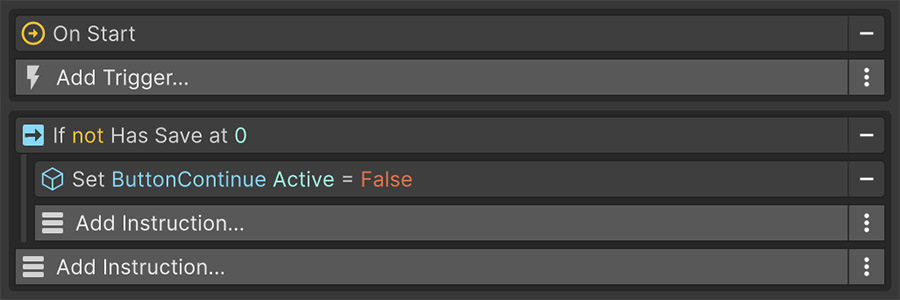
A fresh install hides Continue; once a save exists, the player can select it to resume.
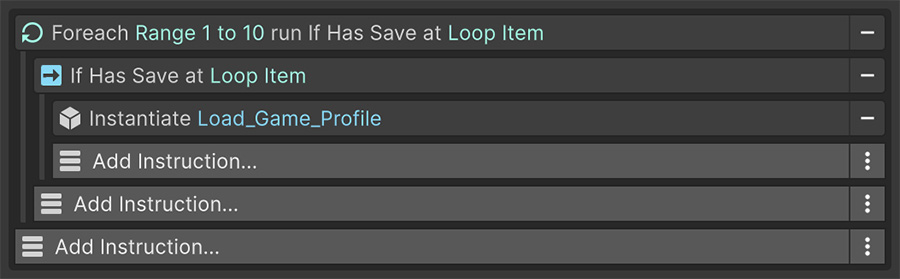
For a slot list, a Foreach over a number range gives you one pass per slot, with Index as the profile number. Inside, a Has Saved Game Condition decides whether to draw a date or the word Empty.
Single-save games#
For a single-save game, use profile 0 for both autosaving and Continue. You don't need to expose profile numbers to the player.
Choosing a profile number#
Profile numbers are integers, so a Signal can provide them. A slot button can pass its index, while an autosave can use a dedicated number outside the manual slot range.
Reserve a slot for autosaves
For example, reserve profile 99 for autosaves and keep the manual slot list below that number. Autosaving then avoids overwriting a manual save.
Shared data#
Save Shared writes data outside the numbered profiles. This data loads automatically and remains available when the player switches slots or starts a new game.
| Belongs in Shared | Belongs in a Profile |
|---|---|
| Audio and graphics settings | Position, health, inventory |
| Key bindings | Quest progress |
| Unlocked characters or levels | The current scene |
| High scores and statistics | Anything about the current playthrough |
Shared data survives a profile being erased
Deleting a profile erases that slot, not the shared data. If you provide a reset option for all game data, include shared data in that operation.
Loading and scenes#
Load Profile loads the scene the save recorded before restoring anything. Which scene, and whether additive scenes come back too, is controlled by the load policy in Save settings.
If the load destroys the Event's game object with the previous scene, that Event can't continue afterward. Place follow-up logic where it survives the scene transition.
Where to go next#
- Save settings — choose where and how saves are written.
- Remember — mark game objects as save subscribers.
- Global Variables — assign asset state to a profile or shared location.