

The Remember component#
The Remember component registers a game object's selected state with the save system. Add Memories to choose which parts of that state to save and restore.
Add it with Add Component → Visual Script → Remember.
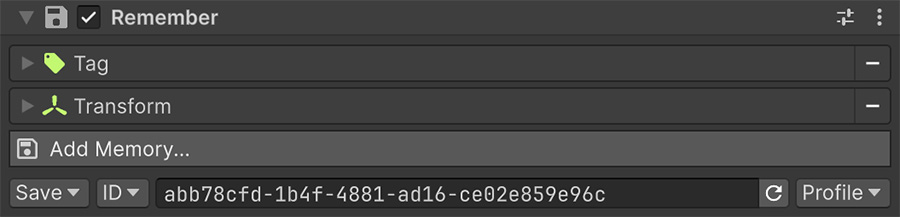
One Remember component holds every Memory
A game object can only have one Remember component. Add all Memories for that object to the same list.
Anatomy#
| Section | Contains |
|---|---|
| Memories | The list of aspects to capture. See Memories. |
| Save Options | Whether to save, the identity to save under, and where the data belongs. |
A new Remember component starts with four Memories: Name, Tag, Layer, and Transform.
Remove any you don't need, because each Memory adds data to the save file and work during loading.
Runtime objects require reconstruction data
A Memory writes values, but a game object or Scriptable Object reference has no meaning in a future session. A Remember component therefore can't reconstruct an object instantiated during Play mode because the save file doesn't identify its prefab.
Save the reconstruction data instead. Store each spawned prefab's identity, position, rotation, and relevant state, then instantiate those objects after loading.
Save options#
| Option | Controls |
|---|---|
| Save | Whether this component participates in saving at all. Set it to Do Not Save to keep the Memories configured but inactive. |
| ID mode | Whether the identity is a fixed ID you control, or a generated one. |
| ID | The identifier the save file uses to match stored data back to this object. |
| Location | Profile for per-slot data, Shared for data common to every slot. |
Choose a stable ID#
The save system uses the ID to match stored data to this object. Keep it unique and stable so later loads restore the correct state.
Duplicated objects share an ID
Copying an object copies its ID. If two Remember components use the same ID, their saved data collides and can't restore both objects independently.
After duplicating an object that has a Remember component, give the copy a fresh ID.
Don't change an ID after shipping
Existing save files reference the old ID. Renaming it silently disconnects the stored data from the object because the identifiers no longer match.
For objects placed in a scene, use a fixed ID such as chest-cellar or door-north-gate. For prefab instances created at runtime, a generated ID gives each instance its own identity.
Persistent versus scene-bound#
A Remember component saves state that belongs to an object in a scene, so its data is restored as that scene loads rather than at the moment the profile is read.
Global Variables exist outside scenes and restore earlier. Their saved state is therefore available when scene objects restore their own state.
What to mark#
Add Remember to objects whose changes need to survive loading. Leave unchanged scenery out of the save to avoid storing and restoring unnecessary data.
| Worth remembering | Not worth remembering |
|---|---|
| Objects the player moves, opens, breaks or collects | Static scenery |
| Anything holding a Local Variable that matters | Purely decorative objects |
| Objects that get destroyed and shouldn't come back | Objects rebuilt on load anyway |
| Doors, chests, switches, checkpoints | Lights that never change |
Verifying it works#
Check that state survives between Play mode sessions:
- Enter Play mode, change the object's state, and save.
- Exit Play mode.
- Enter Play mode again and load the save.
State that survives this test was written to disk. State that survives only an in-session load may exist only in memory.
Where to go next#
- Memories — choose each aspect that the component captures.
- Profiles — assign saved state to slots or shared data.
- Custom memories — capture another component's state from C#.