

Editor#
The Editor section holds your personal settings. Most are stored in Unity's editor preferences and follow you between projects without affecting your teammates. Debug is the exception because it belongs to the project.
It's the last entry in the Settings window sidebar.
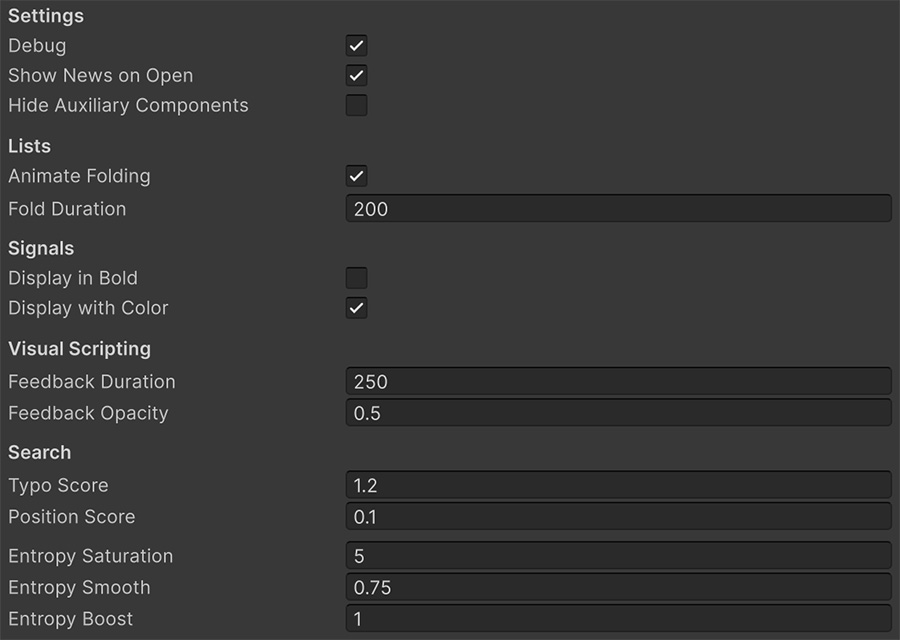
Settings#
| Setting | Controls | Default |
|---|---|---|
| Debug | Whether the debugging tools are compiled in. | On |
| Show News on Open | Whether the News section opens when you start the Unity editor. | On |
| Hide Auxiliary Components | Whether Visual Script's internal components stay out of the Inspector. | On |
Show News on Open controls the routine opening once per editor session. New announcements still appear when they arrive, regardless of this setting.
Debug#
Debug uses a scripting define symbol stored with the project and shared by the team.
| State | Effect |
|---|---|
| On | Logging and gizmo Instructions work normally. |
| Off | They're compiled out of builds entirely. |
Debug output adds work and exposes logged values
Logging adds runtime work and writes values to the player log. Turn Debug off for release when you don't need that output.
Changing the define symbol triggers a recompile, so plan the change as part of release preparation.
This setting affects builds. Breakpoints remain editor-only and never need to be removed for release.
Hide Auxiliary Components#
Visual Script adds helper components to game objects at runtime to cache lookups. It hides them from the Inspector by default because they have no user-configurable fields.
Turn the option off when you need to inspect these components during diagnosis. Otherwise, leave them hidden.
Lists#
| Setting | Controls | Default |
|---|---|---|
| Animate Folding | Whether lists expand and collapse with an animation. | On |
| Fold Duration | How long that animation takes, in milliseconds. | 200 |
Fold Duration grays out while Animate Folding is off.
Turn animation off on a slow machine
Fold animations are cosmetic. On a large project with deeply nested Events, clearing Animate Folding removes the animation work from each expand or collapse action.
Signals#
| Setting | Controls | Default |
|---|---|---|
| Display in Bold | Whether Signal text appears in bold. | Off |
| Display with Color | Whether Signals are tinted by their value type. | On |
Colors distinguish Signal types in an Event. If they distract you or the contrast doesn't work for you, turn Display with Color off to use plain text.
Visual scripting#
| Setting | Controls | Default |
|---|---|---|
| Feedback Duration | How long the flash of feedback lasts after an Instruction runs, in milliseconds. | 250 |
| Feedback Opacity | How strong that flash is. | 0.5 |
The feedback flash is the highlight that shows which Instruction is currently executing during Play mode. Increase the duration to follow fast sequences, or shorten it to reduce lingering highlights in a busy Event.
Search#
These settings control result ranking when you search for a Trigger, Instruction, Condition, or Signal to add:
| Setting | Controls | Default |
|---|---|---|
| Typo Score | How much a result matched with a typo is worth. Set it to 0 to require exact matching. |
1.2 |
| Position Score | How much a match near the start of a name counts. | 0.1 |
| Entropy Saturation | Saturation of the entropy curve. | 5 |
| Entropy Smooth | Smoothness of that curve. | 0.75 |
| Entropy Boost | Coefficient applied to the result. | 1 |
The last three shape term frequency–inverse document frequency (TF-IDF) weighting, which gives rare words more influence than common ones. Keep their defaults unless you are tuning search ranking deliberately.
Adjust Typo Score to control fuzzy matching. Raising it ranks near-misses higher, while setting it to 0 requires an exact match.
Where to go next#
- Settings window — distinguish project settings from personal preferences.
- Debugging — inspect what the Debug toggle includes.