

Running a Function#
Use the Run Function Instruction to start a Function from an Event, or from inside another Function. You'll find it under Control in the Instructions dropdown, and it tells the Function which game objects to work on and whether the caller should wait.
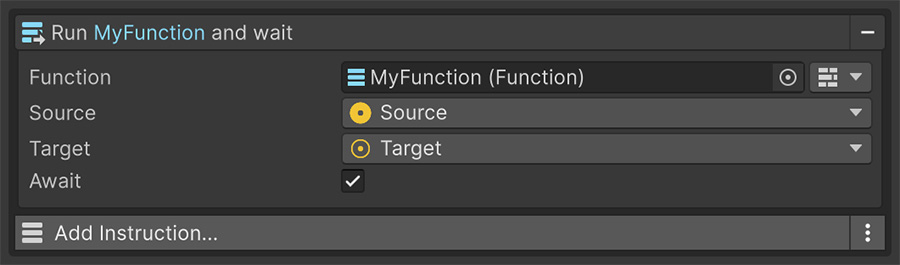
| Field | Controls | By default |
|---|---|---|
| Function | Which asset runs. | Empty. |
| Source | The game object the Function receives as Source. | The calling Event's Source. |
| Target | The game object the Function receives as Target. | The calling Event's Target. |
| Await | Whether the caller waits for the Function to finish. | On. |
Choosing Source and Target#
Most of the time you can leave both fields alone. The Event's own Source and Target pass straight through, which is usually what you want.
Change them when the Event isn't on the object the Function should act on. For example, a boss arena's manager might point Target at the boss before running Hit Flash, so the boss flashes rather than the manager.
Waiting for it, or not#
Await decides what the caller does after starting the Function:
| Await | The caller | If the caller is canceled |
|---|---|---|
| On | Waits for the Function to finish, then runs its next Instruction. | The Function stops too. |
| Off | Runs its next Instruction right away, while the Function carries on. | The Function keeps running. |
Leave Await on when the next step depends on the Function being finished. An Open Gate Function needs to finish before the Event releases the enemies behind the gate.
Turn it off when the Function is a side effect that shouldn't hold anything up. A Hit Flash Function can run in the background while the Event moves on to the rest of the damage logic.
A Function running in the background can't be stopped
With Await off, the Function has no connection to its caller. Cancel Event doesn't reach it, and neither does disabling or destroying the calling object, so it always runs to the end.
Avoid endless loops in a Function you run this way. If something should stop along with its caller, leave Await on.
Overlapping runs#
You can run a Function from several Events at once, or again while it's still running. Each run works from its own copy of the list with its own Source and Target, so ten enemies can flash at the same time without interrupting each other.
Choosing a Function at runtime#
The Function field is a Signal that reads a Scriptable Object. It usually holds one asset, but it can also read one from a variable, which lets an Event run a different Function depending on the object.
Each enemy attacks in its own way
- Create two Functions:
Melee AttackandRanged Attack. - Give each enemy prefab a Local Variable with a Scriptable Object entry tagged
attack, holding the Function it should use. - In a shared Event, point Run Function's Function field at the
attackvariable.
The Event stays the same for every enemy, and each prefab decides what its attack does.
If the field doesn't resolve to a Function asset, Run Function does nothing and the Event moves on without an error. Check the field first if a Function never seems to start.
Where to go next#
- Creating a Function — build the list of Instructions the caller runs.
- Source & Target — see which objects each Trigger supplies.
- Control flow — cancel Events, which also stops any Function they're waiting on.
- Memos — hand extra values to a Function.