

Encrypting saves#
You turn on encryption from Save settings, where it applies to everything the project writes: every profile, plus shared data such as channel volumes. Settle on your configuration before release, because changing it later can make existing saves unreadable.
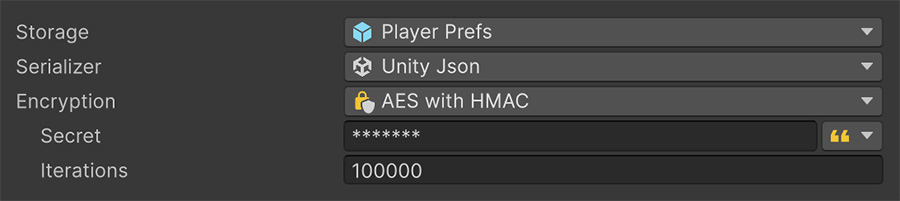
Turning it on#
- Open
Window→Visual Script→Settingsand select the section named after your project. - Set Encryption to AES with HMAC.
- Replace the value in Secret with your own text.
- Leave Iterations at its default unless you have a reason to change it.
| Field | Controls | By default |
|---|---|---|
| Secret | The text the encryption keys are made from. | A placeholder value. |
| Iterations | How much work it takes to turn the Secret into keys. | 100000 |
Replace the default Secret
Every project starts with the same default value, so a save encrypted with it isn't protected from anyone else who has the module.
Checking the result#
- Set Storage to Json File, so the save is a file you can open.
- Enter Play mode and run Save Profile.
- Open the save file in your game's persistent data folder. You should see a long block of unreadable text.
- Run Load Profile. The game state comes back, and the Console shows no warnings.
Where the Secret comes from#
Secret is a String Signal, so it doesn't have to be text typed into the field. Your choice decides whether the Secret ships inside your game, and whether Visual Script can read saves as the game starts:
| Source | Ships in the build | Auto-Load Shared |
|---|---|---|
| Text typed into the field | Yes | True |
| A Global Variable | Yes, if the value is authored in the asset | False |
| A value received from a server | No | False |
| A custom Signal written in C# | Depends on the Signal | False, unless the Signal returns its value before the first scene loads |
Typed text suits most single-player games, where the goal is to discourage save editing. The other sources may not have a value yet when Visual Script reads saves as the game starts. That includes a Global Variable authored in the asset, because Visual Script can read shared data before Global Variables are set up. With an empty Secret, the save file is rejected.
Instead, load saves once the Secret has its value:
- In Save settings, set Auto-Load Shared to False.
- In your first scene, get the Secret and store it where the Secret field reads it, such as a Global Variable.
- Run Load Shared. Channel volumes and the list of saved profiles come back, and Load Profile works from then on, so run it next to continue a saved game. Auto-Load Profile can't do this, because it only runs as the game starts, before the Secret arrives.
Run Load Shared only once the Secret has its real value. With a placeholder, Visual Script rejects the file, and the next save replaces it.
Saving before Load Shared loses the profile list
Save Shared, Save Profile, and Delete Profile write shared data, including the list of saved profiles. Run one before Load Shared, such as from a volume slider while the Secret is still on its way, and the list loses every profile saved in earlier sessions. With an empty Secret, the Console shows The AES encryption Secret is empty, but by then the list is already gone.
If the Secret never arrives, such as when the server is unreachable, let the game run on default values and don't offer saving in that session.
The Secret is also read outside any Event, so Source and Target have no object to refer to. A Signal that depends on them, such as a Local Variable on Source, reads as empty, and Visual Script rejects the save file.
Choosing the Iterations#
A higher Iterations value slows down anyone trying to guess your Secret. It also slows your game, because the keys are worked out again for the first save or load of a session and for each save written in another session.
The value is limited to the range 10000 to 1000000, and anything outside it uses the nearest limit. Keep the default unless you've tested a different value on your slowest target device.
Changing settings after release#
Existing saves depend on these settings, so check this table before changing them in an update:
| Change | Existing saves |
|---|---|
| A different Iterations value | Still load. Each save records the value it was written with. |
| A different Secret | Are rejected. |
| From None, Caesar, or XOR to AES with HMAC | Are rejected. |
| From AES with HMAC to another option | Can't be read. |
A rejected save can be overwritten
A rejected file doesn't stop the game. Visual Script logs a warning starting with Could not decrypt save data and carries on with no data from that file, and the next save to that slot replaces it for good.
Test your final settings before shipping, and only change the Secret in an update if you accept that players lose their saves.
Where to go next#
- Save settings — compare storage options and plan each stage of development.
- Profiles — learn what belongs to a save slot and what's shared.
- Custom encryption — write your own option in C#.